
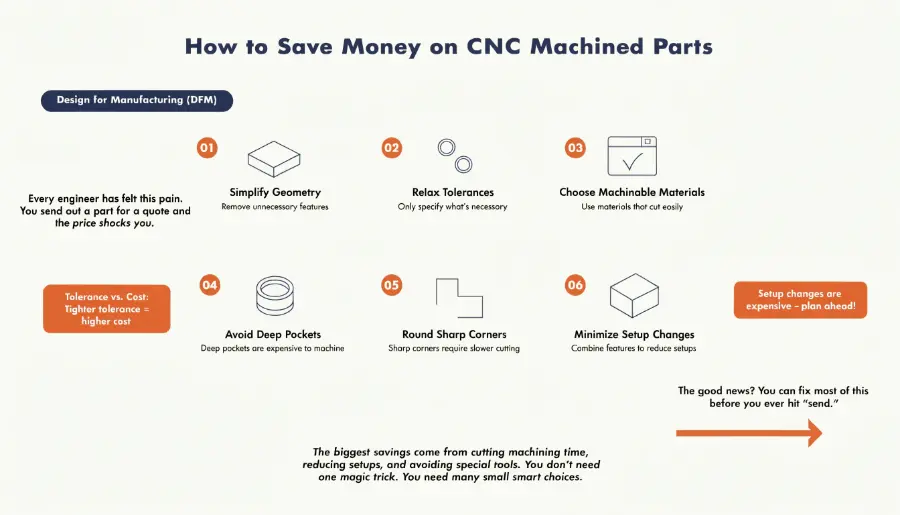
Every engineer has felt this pain. You send out a part for a quote and the price shocks you. The design looked simple on your screen. But small choices in your CAD file can quietly double the cost1. The good news? You can fix most of this before you ever hit "send."
DFM for CNC machining means designing parts that are easy and fast to cut. To lower cost, you simplify the geometry, relax tolerances you do not need, and pick materials that machine well. The biggest savings come from cutting machining time, reducing setups, and avoiding special tools.2 You do not need one magic trick. You need many small smart choices.
I have spent years watching great designs cost too much for silly reasons. A sharp corner here. A deep pocket there. These add up fast. Below I break down the tips that save the most money. Each one is simple. Each one works.
Why Does Part Geometry Drive So Much of the Cost?
You may think material is the main cost. It is not. Time on the machine is the real driver. And your geometry decides that time. Complex shapes force slow cuts. They also force more tool changes and more errors.
Part geometry drives cost because CNC machines charge by time and complexity. Deep pockets, sharp inside corners, and thin walls all slow the machine down. Deep cavities cause tool deflection and long cycle times. Thin walls vibrate and warp. Simple, shallow, and rounded shapes cut faster, cost less, and produce fewer scrapped parts.
Deep Pockets Are Expensive
When a pocket is deeper than four times the tool diameter, trouble starts. The tool bends. The machine must slow down to keep control. Cycle time grows. So does cost. I always ask clients if a pocket can be shallower. Most of the time, it can.
Round Your Inside Corners
Sharp inside corners force a smaller tool. Smaller tools cut slower and break more. Instead, add a radius. Make it at least one-third of the cavity depth. This lets a standard tool do the job. No custom tooling needed.
Watch Your Wall Thickness
Thin walls shake during cutting. They warp. They crack. This ruins parts. Keep metal walls above 0.8 mm. Keep plastic walls above 1.5 mm. If the part allows, make them thicker.
| Feature | Bad Choice | Better Choice |
|---|---|---|
| Pocket depth | 5x tool diameter | Under 4x tool diameter |
| Inside corner | Sharp square | Radius ≥ 1/3 depth |
| Metal wall | 0.5 mm | 0.8 mm or more |
Small changes here often cut both machine time and scrap risk at once.
How Do Tolerances and Holes Affect Your Quote?
This one surprises many engineers. You set a tight tolerance out of habit. But that habit costs real money. Every tight number means more careful cutting and more inspection. Do this everywhere, and your price soars.
Tight tolerances and odd hole sizes raise cost because they need special tools, slower cuts, and extra inspection. Tolerances tighter than ±0.005 inches dramatically raise machining and checking time. Nonstandard holes force custom drills or extra setups. Use standard drill sizes and apply tight tolerances only to features that truly need them for function.
Tolerance Only Where It Matters
I once reviewed a part where every dimension had a ±0.005 inch callout. Only two features actually needed it. We loosened the rest. The price dropped a lot. Ask yourself: does this surface mate with something? If not, relax it.
Use Standard Hole Sizes
Drill bits come in common sizes. Match them. A standard hole uses a standard drill in one quick pass. A custom hole may need boring or a special tool. That means more time and more money.
Keep Threads Modest
Long threads feel strong. But extra thread length rarely adds much strength. It does add risk. Deep taps break more often. Keep thread depth no more than three times the hole diameter.
| Item | Costly Approach | Smart Approach |
|---|---|---|
| Tolerance | Tight everywhere | Tight only on critical features |
| Holes | Custom diameters | Standard drill sizes |
| Threads | Very deep | Up to 3x hole diameter |
These choices trim inspection labor and tool wear. Your quote gets friendlier fast.
Which Design Habits Cut Setups and Special Work?
Here is a hidden cost most people miss. Every time the machine must flip or re-clamp your part, you pay. Each setup adds labor. Each setup adds a chance for error. Reducing setups is one of the fastest ways to save.
You cut setups by designing parts that machine from as few sides as possible. Consolidate small pieces into one part when you can. Remove engraved text, since fine lettering needs slow tools. Pick easy-to-machine materials like aluminum 6061. Each removed setup, special operation, or exotic material saves labor time and lowers your final price.
Design for Fewer Setups
Try to keep your key features on one side. When the machine works from one direction, it moves fast. When it must flip the part, someone re-aligns it. That takes time and skill. Fewer setups means fewer chances for mistakes.
Skip the Engraving
Text looks nice. But machining letters is slow work. A fine tool crawls along each line. If you do not need engraved text, drop it. A printed label or laser mark is often cheaper.
Pick the Right Material
Not all metals cut the same. Aluminum 6061 is a joy to machine. Exotic alloys fight the tool. They wear it out and force slow speeds. If your performance needs allow it, choose the easier material.
Combine Parts When You Can
Sometimes two or three small parts can become one machined piece. This cuts assembly labor. It also removes tolerance stack-up between parts. One good part beats three tricky ones.
A simple rule I love: radii inside, chamfers outside. Inside fillets are cheaper than square corners. A 45-degree chamfer is cheaper than an outside radius. Before you send any part for a quote, run through this quick checklist:
- Can I remove any pockets, ribs, or bosses?
- Can I add corner radii or thicker walls?
- Can I use standard holes and threads?
- Are tight tolerances only on critical features?
- Can the part be made in fewer setups?
- Is there a cheaper, machinable material that still works?
Conclusion
Cutting CNC cost is not magic. You simplify shapes, round your corners, and relax tolerances you do not need. You use standard holes, fewer setups, and easy materials. Small smart choices in your design add up to big savings on every quote.
-
"The Impact of CNC Machining", https://doug-machine.com/the-impact-of-cnc-machining/. Research on design-for-manufacturing principles indicates that design decisions can significantly impact manufacturing costs, with some studies showing cost variations ranging from 50% to several hundred percent depending on geometric complexity, tolerance specifications, and material selection. Evidence role: statistic; source type: research. Supports: the magnitude of cost impact from design choices in CNC manufacturing. Scope note: Studies typically examine cost variation across a range of design parameters rather than isolating individual CAD choices, and actual cost impact varies by part complexity, production volume, and manufacturing context. ↩
-
"Technology reduces time, costs for machinists nationwide", https://www.ornl.gov/success-story/technology-reduces-time-costs-machinists-nationwide. Manufacturing cost analysis identifies machining time, setup operations, and tooling as major cost components in CNC production, with labor and machine time typically representing the largest share of per-part costs in low-to-medium volume production. Evidence role: general_support; source type: research. Supports: the primary cost components in CNC machining operations. Scope note: The relative importance of each cost factor varies substantially based on production volume, part complexity, and whether production is prototype, small-batch, or high-volume manufacturing. ↩